Derive Growth Lab is the in-house tool that runs the Instagram accounts of
Derive, a study app, and of the creators who post for it. A viewer watches a
Reel, comments an agreed keyword such as derive, and the app answers them: a short
public reply under the comment, and a private reply in Instagram Direct carrying the guide or
link the comment asked for. This page describes that integration, and nothing else.
Three screens, in order. These are real screenshots of the product, not mock-ups.
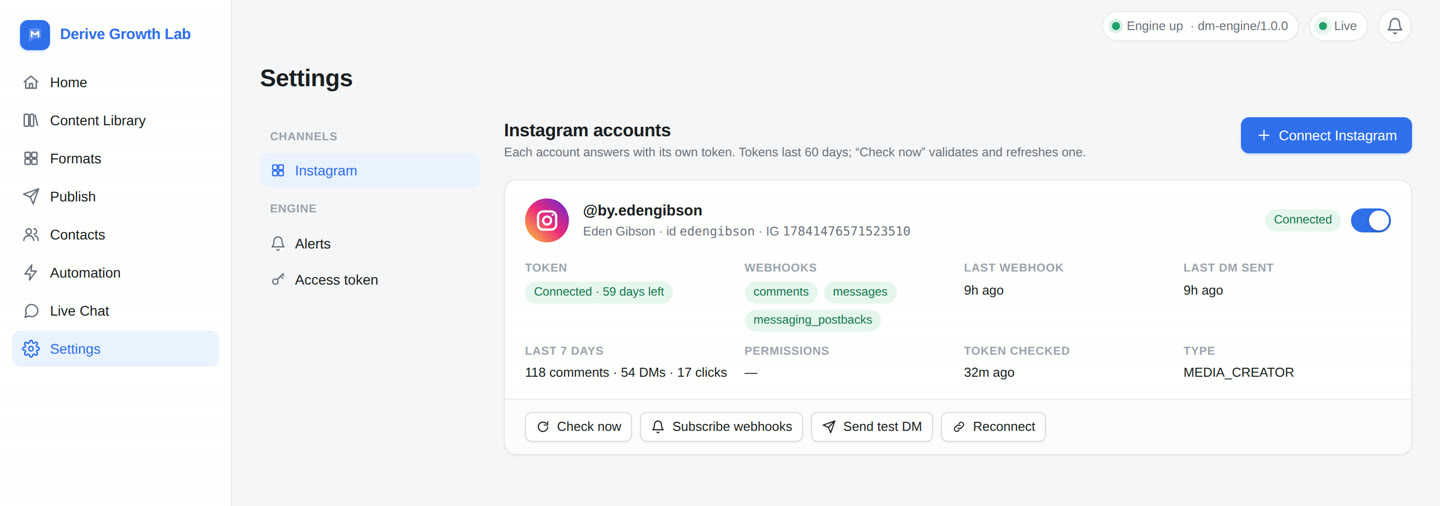
An account is added by its owner signing in to Instagram and granting consent. Growth Lab
stores one access token per account, subscribes that account's comments and
messages webhooks, and shows what it holds: whose account it is, when the token
expires, and when the last webhook and the last DM happened.
Every account connected today is one we own and operate. Disconnecting an account, or revoking the token from Instagram, stops it answering immediately.
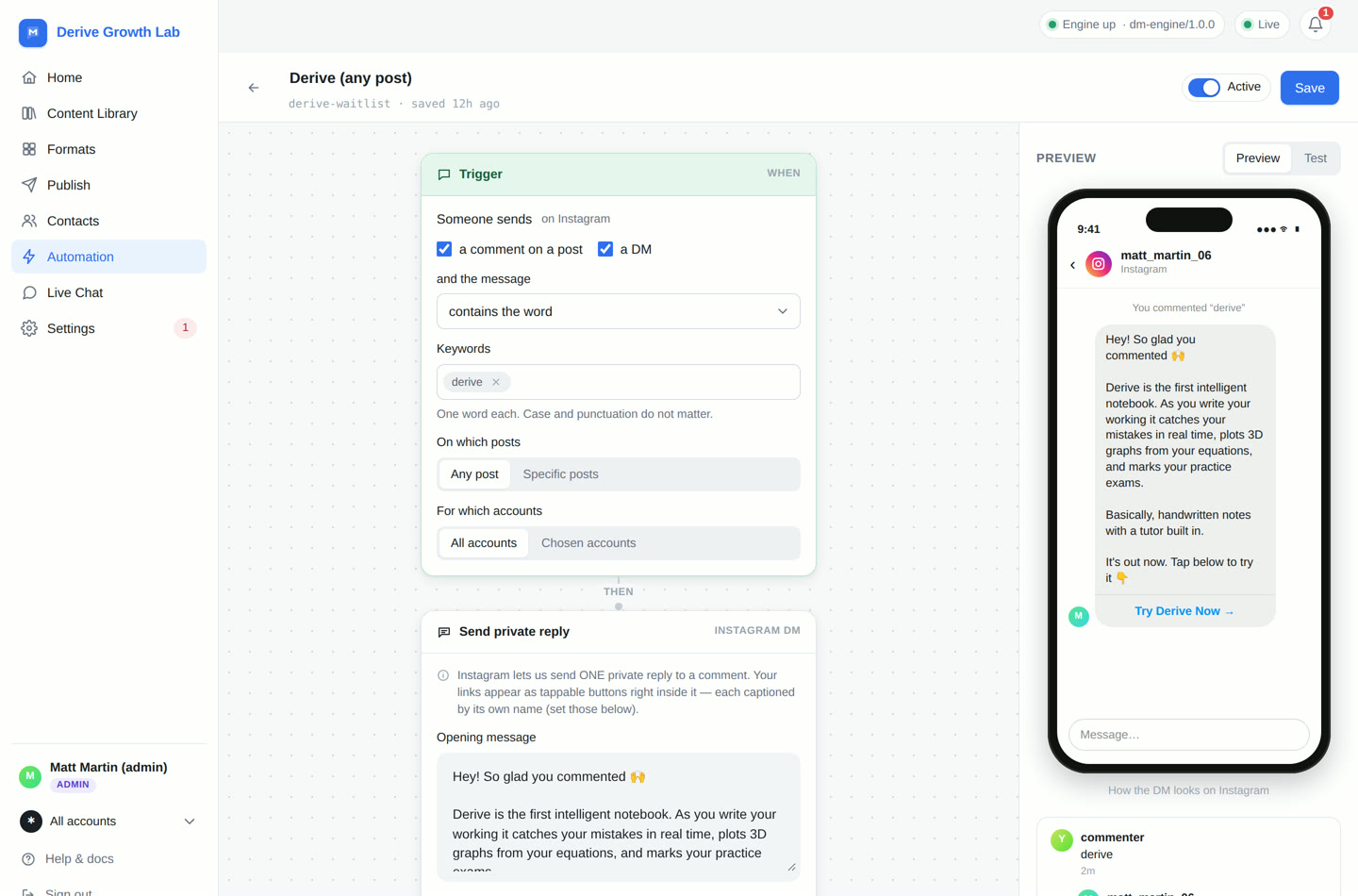
An automation is a trigger and a reply. The trigger is a keyword — one word, case and punctuation ignored — on a comment or a DM, on any post or on named posts. The reply is written once and previewed exactly as the commenter will see it in Instagram Direct.
Instagram allows one private reply per comment, so that message carries everything: a short explanation of what Derive is, and the link as a tappable button. Nothing is sent to anyone who has not commented or messaged first.
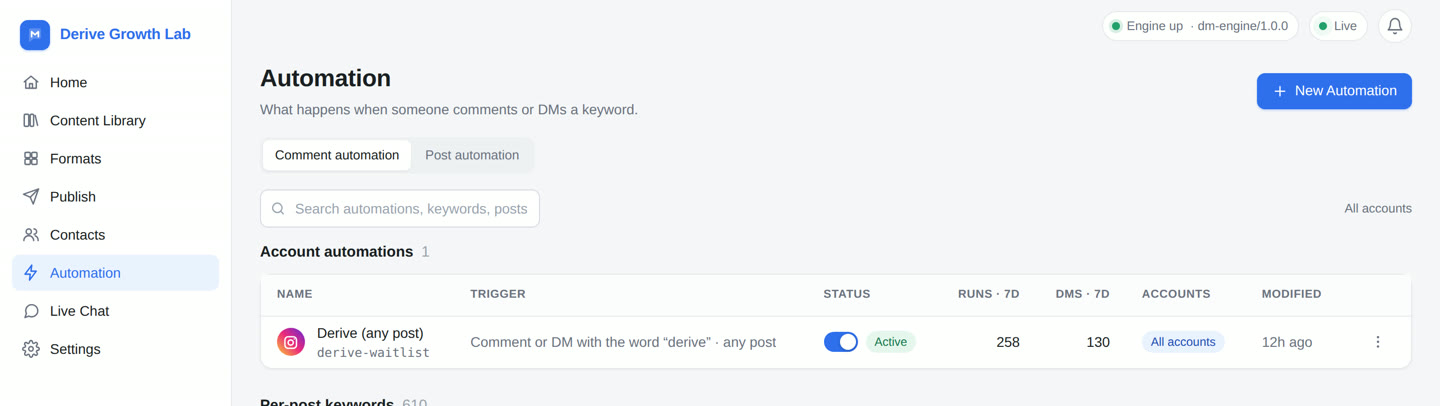
Comments arrive on the webhook as they are posted. The app matches the comment against the automations for that account and that post, replies publicly under the comment, sends the private reply, and records the result. Each automation shows how many times it ran, how many DMs it sent and when it last did anything.
A comment that matches nothing is ignored and no message is sent.
The three permissions the integration above needs, and the specific thing each one does. Nothing in the app uses them for anything else.
Identifies the connected professional account — its Instagram user id and username — and reads that account's own media list and permalinks, so a reply can be attached to the right post and the operator can see which post an automation is armed on.
Only the connected account's own profile and media are read.
Receives the comments webhook for the connected account's own media, reads the comment text to test it against the keyword, and posts the short public acknowledgement under it ("just DM'd you the link 🙌 check your inbox").
Comments are read only on media owned by the connected accounts. We never read comments on anyone else's posts.
Sends the private reply to the person who commented, and answers them if they reply inside Instagram's messaging window — for example tapping a quick reply to ask for the link again.
A message is only ever sent in response to that person's own comment or message. The app sends nothing unsolicited, and never messages a list.
The integration keeps the least it can and stores it on our own server in Australia. The full statement is in the Privacy Policy.
Growth Lab is not a public sign-up product. It is used by Derive Notes Pty Ltd and the creators it works with, on Instagram accounts those people own. There is no self-serve registration; an account is added by us, for an account whose owner has granted consent in Instagram.
This page describes the Instagram comment → DM integration. Growth Lab also publishes video to Instagram, TikTok and YouTube — that side of the product is described on the overview page.
 Derive Growth Lab